Review meetings directly from Outlook
Rate and review your meetings from within Outlook
BeeCastle being built for Microsoft 365 is deeply integrated with platforms like Outlook. Rate and review your meetings from within Outlook in your end of day BeeCastle email.
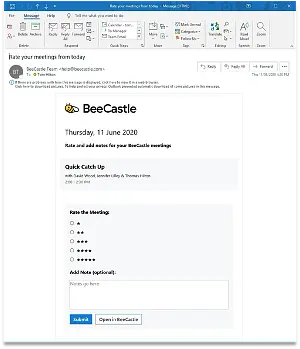
You will receive emails at the end of your workday if you had a meeting or call with a BeeCastle contact during the day. If you use the Outlook app on your phone, on the web or on your desktop device, you will be able to directly rate & add notes for those meetings within the email itself. Just select the rating, add the note and press 'submit'.
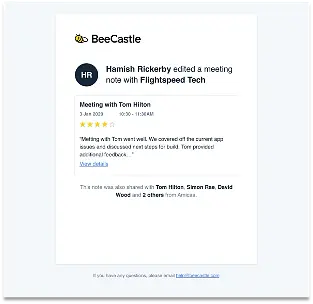
Those records will now show up in BeeCastle & any team members who are BeeCastle users that attended the meetings will be notified that the note was added. No need to manually share!
Was this article helpful?
Related articles
Open Opportunities "Next Meeting" and "Stage" filter
How to use the "Next Meeting" column and the "Stage" filter on the Open Opportunities view to quickly review pipeline.
Engage with BeeCastle featuresCustomer Profitability - Set Up & Data
This guide shows you how to set up and sync your data for Customer Profitability
Engage with BeeCastle featuresCreate Meetings from Open Opportunities
Quickly action meetings when you need to and save time
Engage with BeeCastle featuresTrack Your Contracts in BeeCastle
Now you can see all of your contracts in BeeCastle and stay ahead of the game!